When querying SAP SuccessFactors Compound Employee using queryMode=delta together with resultOptions=renderPreviousTags, deleted job records may still appear in the response. This document explains why this happens, how timestamps and previous tags are calculated, and how to correctly handle this behavior in SAP CPI or downstream systems.
Business Scenario
Organizations commonly integrate employee data from SAP SuccessFactors Employee Central to downstream systems using delta queries. A frequent assumption is that deleted records should no longer appear in API responses.
However, when using Compound Employee in delta mode, integration developers may observe:
– Deleted job records still being returned
– *_previous fields showing unexpected values
– Mismatches between UI state and API output
This document clarifies these behaviors using a real-world job information scenario.
Understanding Compound Employee Delta Queries
Compound Employee delta queries are driven by system modification timestamps (last_modified_on), not by the current UI state. Any change to a record—creation, update, or deletion—updates this timestamp and makes the record eligible for delta extraction.
This design ensures that downstream systems are aware of every change that occurs in SuccessFactors, including deletions.
Employee Job History Timeline
The following timeline illustrates the employee job history used in this scenario.
| Event | Effective Start Date | Cost Center | Notes |
| New Hire | 1998-03-01 | South Africa Production (ZA01-4200) | Initial job record |
| Job Change | 2026-01-30 | South Africa Procurement (ZA01-2300) | Job change created |
| Future Job Record | 2026-02-05 | South Africa Production (ZA01-4200) | Future-dated change created |
| Deletion | 2026-01-30 | South Africa Procurement (ZA01-2300) | Job record deleted in UI |
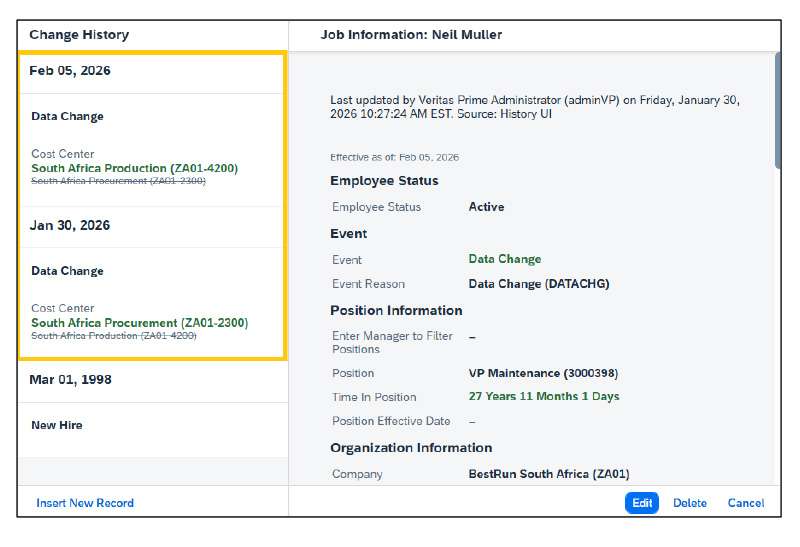
Figure 1: Job Information in SuccessFactors UI before deletion.
Figure 2: Job Information in SuccessFactors UI after deletion
Delta Query Execution and Observed Results
The Compound Employee API was queried using delta mode with renderPreviousTags enabled and a last_modified_on timestamp greater than 2026-01-30T15:22:40Z.
Despite the deletion of the January 30 job record in the UI, the API response returned both the active job record and the deleted job record.
Explanation of Job Information Records in Delta Response
The following job_information records are returned as part of a Compound Employee delta query with queryMode=delta and resultOptions=renderPreviousTags. Although one of the records has been deleted in the SuccessFactors UI, both records appear in the delta response to preserve historical consistency.
Active Job Information Record (Effective 2026-02-05)
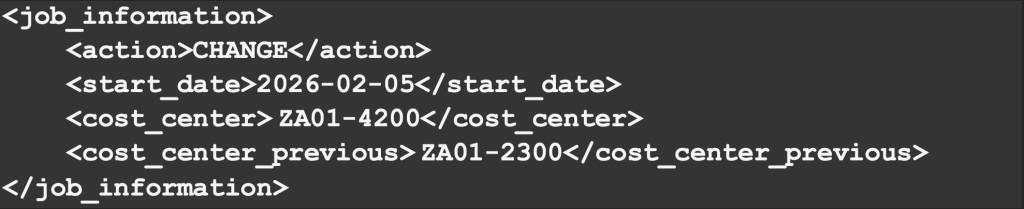
This record represents the currently effective Job Information after the deletion was performed. The employee’s cost center was reverted to ZA01-4200, effective from February 5, 2026.
The <cost_center_previous> tag is populated with ZA01-2300, indicating that the immediately preceding job record—before the effective-dated recalculation—had a different cost center. This previous value reflects the system’s historical understanding of the job change, not necessarily the current UI state.
Deleted Job Information Record (Effective 2026-01-30)

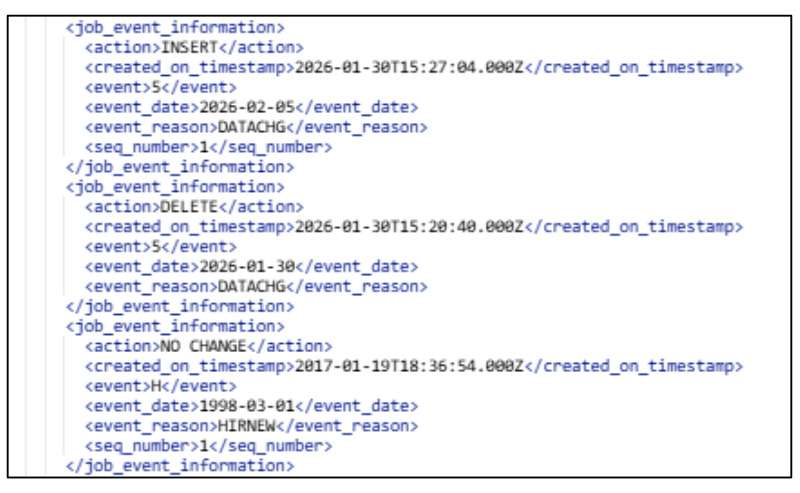
Figure 3: Job Event Information Reflecting Insert, Delete, and Historical Job Events in a Compound Employee Delta Response
This record corresponds to the Job Information entry that was deleted from the SuccessFactors UI. Even though it no longer exists in the front end, it is still delivered in the delta response because the deletion itself represents a change event.
SuccessFactors does not explicitly mark deleted job records with a DELETE action. Instead, the system recalculates the effective-dated job timeline and includes the deleted record in the delta output to allow downstream systems to understand the full sequence of changes that occurred.
Why the _previous Tag Appears for a Deleted Record
The _previous tag appears when:
- renderPreviousTags is enabled in the query, and
- A record is affected by an insert, update, or delete operation.
In this scenario, the _previous value (ZA01-2300) represents the cost center from the job record that existed before the recalculation triggered by the deletion. This ensures that consuming systems can reconcile changes correctly, even when historical records are removed.
Why Deleted Job Records Appear in Delta Responses
Deletion of a job record is treated as a system change. When a record is deleted, SuccessFactors updates its last_modified_on timestamp. Delta queries return this change to ensure downstream systems can react appropriately.
Additionally, SuccessFactors do not physically remove deleted records from the database. They are logically deleted to preserve audit history and data consistency.
Understanding *_previous Fields
The *_previous fields provided by renderPreviousTags represent historical comparisons between adjacent effective-dated records. These fields are history-aware, not UI-aware.
As a result, previous values may still reference deleted records if they were part of the job history at the time the change occurred.
Recommended Handling in SAP CPI
Integration logic in SAP CPI must explicitly handle deleted job records. Common approaches include:
– Processing only the latest active job record based on start_date
– Avoiding renderPreviousTags when historical comparison is not required
How to Handle Deleted Job Records and Job Events in Integrations
Deleted Job Information records appearing in Compound Employee delta responses is a standard SuccessFactors behaviour and must be handled through integration design, not UI assumptions. Since deletions are not always explicitly reflected in job_information, integrations should rely on a combination of delta semantics, job event actions, and effective-dated comparison logic.
Use Job Event Information as the Deletion Indicator
SuccessFactors explicitly communicates deletions through the job_event_information entity. When an event is removed from the system, it is delivered with an action = DELETE, even though the corresponding Job Information record may still appear in the delta payload.
Handling approach:
- Identify job_event_information records with action = DELETE
- Use event, event_date, and event_reason to correlate the deletion with previously processed job data
- Mark the corresponding job records as deleted or end-dated in downstream systems
This is the most reliable way to detect deletions.
Do Not Rely on Job Information Action Alone
Job Information records related to deletions often appear with action = CHANGE. This does not indicate an update but reflects a timeline recalculation triggered by the deletion.
Best practice:
- Treat Job Information delta records as state transitions
- Avoid interpreting CHANGE as a simple field update
- Always evaluate the record in relation to surrounding effective-dated entries
How I Would Handle This Scenario in SAP CPI
In this scenario, an intermediate Job Information record effective 2026-01-30 was deleted after a newer Job Information record effective 2026-02-05 was created. As a result, the Compound Employee delta response contains both active and deleted job-related data, along with _previous values reflecting historical recalculation.
To handle this correctly in SAP CPI, the integration should follow the steps below.
Step 1: Identify the Latest Effective Job Record
For each employee, determine the currently effective Job Information by evaluating:
- start_date
- Effective date ordering
In this case:
- The Job Information record with start_date = 2026-02-05 is treated as the active record.
- This record should be upserted or retained in the target system.
Step 2: Detect the Deleted Job Record Using Job Event Information
Next, analyse job_event_information records:
- Identify entries where action = DELETE
- Match the event, event_date, and event_reason with job history already processed
Here, the DELETE event confirms that the Job Information record effective 2026-01-30 was removed in SuccessFactors.
Action in CPI:
- Mark the Job Information record with start date 2026-01-30 as deleted or end-dated in the downstream system.
- Do not re-create or re-upsert this record.
Step 3: Ignore Deleted Records During Job Information Processing
Although the deleted Job Information record still appears in the delta response:
- It must not be treated as an active change
- It must not be upserted again
Rule applied:
- If a Job Information record corresponds to a deleted job event, exclude it from active processing.
Step 4: Use *_previous Fields Only for Context
The _previous fields (cost_center_previous) indicate historical values before the deletion-driven recalculation.
Step 5: Update Cache for the Next Delta Run
After processing:
- Update the CPI cache or persistence layer with:
- Active Job Information records
- Logical deletion markers for removed records
- Store the latest successful delta timestamp
This ensures that:
- The deleted record is not reprocessed
- Future delta runs remain consistent.
Outcome of This Handling
By applying the above logic:
- The active job record (2026-02-05) remains intact
- The deleted record (2026-01-30) is correctly removed from active processing
- Historical consistency and auditability are preserved
Duplicate or incorrect updates are avoided
Conclusion
Deleted Job Information records appearing in Compound Employee delta queries is an expected and intentional behaviour of SAP SuccessFactors. Delta mode is designed to guarantee data consistency and historical accuracy, not to reflect only what is currently visible in the SuccessFactors UI. When renderPreviousTags is enabled, the API deliberately exposes historical transitions to help consuming systems understand how and why a record changed over time.
As illustrated in this scenario, deleting an intermediate Job Information record does not erase its impact on the employee’s job history. Instead, SuccessFactors recalculates the effective-dated timeline and delivers both the active and previously effective values through <*_previous> tags. This allows downstream systems to reconstruct the full sequence of changes, even when records are removed from the front end.
Understanding this behaviour is critical for building reliable and predictable integrations. Middleware platforms such as SAP CPI must not assume that the absence of a record in the UI means it will be absent from delta responses. Instead, integrations should evaluate:
- Effective start and end dates
- Sequence and last-modified timestamps
- Previous value tags in relation to the active record
By applying appropriate filtering, comparison, and reconciliation logic in SAP CPI, organizations can avoid misinterpreting deleted records as new or duplicate changes. This approach ensures accurate synchronization, preserves audit integrity, and aligns downstream systems with SuccessFactors as the system of record.
Ultimately, a clear understanding of delta query semantics, effective dating, and historical recalculation behaviour enables enterprise integrations that are resilient to retroactive corrections, deletions, and data realignments—common realities in HR master data management.