
Key Steps to Transition to SAP® SuccessFactors Latest Goal Management in 2025
When SuccessFactors made Latest Goal Management (LGM) available in the H1 2021 release, many existing customers asked the question ‘When should we upgrade’? With a universal push coming March 2025 , the burning question is now ‘How can I prepare my business for the upgrade?’
Latest Goal Management is scheduled to be a universal push around March 31st, 2025.
Many customers want to know if current functionality in Goal Management will be available in the latest version. As with many upgraded tools, parity between versions takes time. SuccessFactors added new features with each release. With the H1 2024 release, SuccessFactors has bridged the gap between versions, with features such as supporting initiatives, legal scan, and enhanced PDF printing.
Overview of Latest Goal Management:
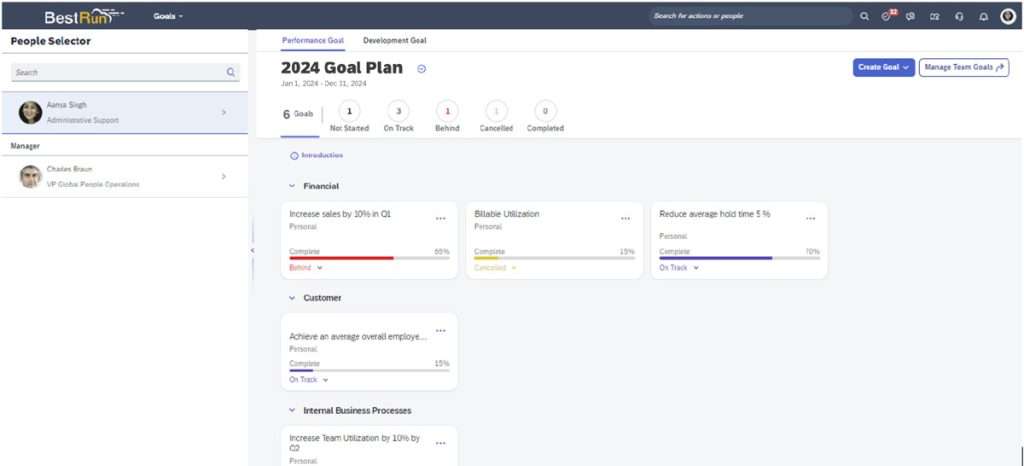
Latest Goal Management is part of SuccessFactors’ focus to reimagine the goal management user experience. Consisting of both performance goals and development goals, it is designed to provide a new experience to create, track, assign, and manage goals in an organization. The user interface is cleaner and aligns with the Horizon theme. It also includes the People Selector column on the left side of the page, thereby unifying the design used in Continuous Performance Management.
Feature Parity
In H1 2024, SuccessFactors added most of the remaining key features from the legacy version of goal management. These include:
- Goal Initiatives
- Legal scan for Goal comments
- Goal Alignment Chart
- Enhanced Support for Printing PDF Goals
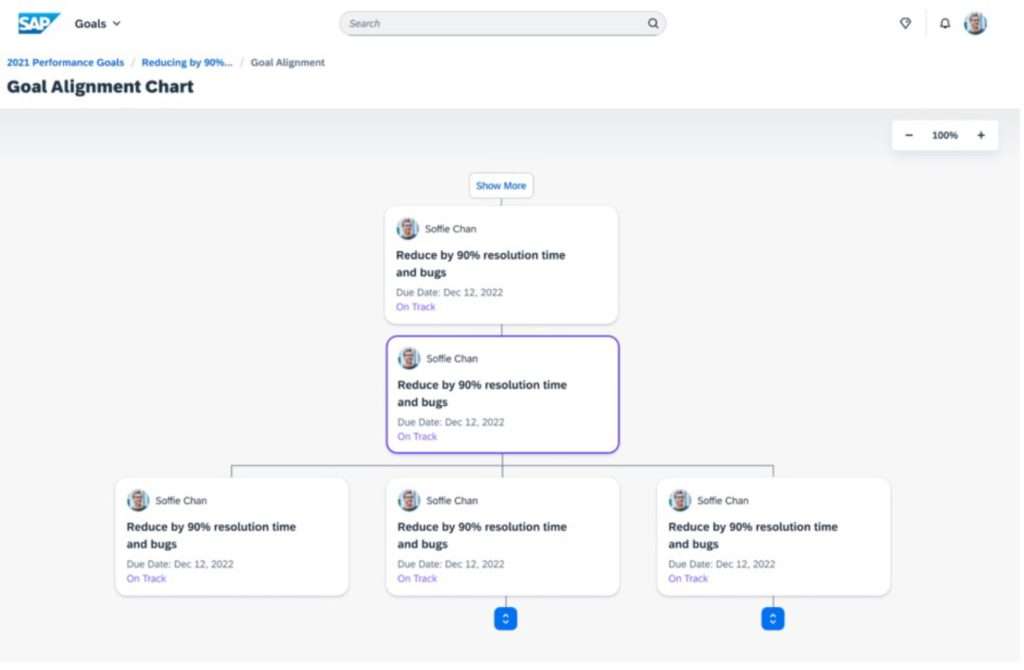
The Goal Alignment Chart will now be available to show a visual hierarchy of cascaded goals. Access to the alignment chart can be via the goal card or the goal detail’s view. Only three levels of goal alignments will display by default but clicking the drill down arrows will show additional levels.
The Goal Alignment chart will work with multiple goal plan templates whereas in previous versions the chart would only show alignment for one goal plan template at a time.
Remaining Gaps
The following features are not supported in Latest Goal Management:
- SMART goal wizard
- Goal aligning (linking goals)
- Spell Check and Coaching Advisor
- Search for inactive users
- Move goal up/down on the goal plan
- Print goals to HTML output
- Add development goals to People Profile
- Indent/Outdent on the goal plan
- Navigate from goal plans to Goal Alignment Spotlight
- Mass assign group groups via the goal plan
- Summary section on the goal plan
- Layout configuration of the goal plan
- Automatic goal numbering
- Task or targets of subgoals
- Peers in People Selector
- OData APIs (V4)
- Group goals
How to support your business with this change
1) We offer our customers three pieces of advice. 1) Upgrade to the Latest Goal Management in your TEST or PREVIEW environment to help prepare you for the inevitable. Convert your existing goal plans and practice using the module thoroughly.
2) Test as much as possible. Nothing can prepare you more than testing new features in a test environment and pushing the limits of the tool in a ‘safe’ environment.
3) Run a report to download all existing goals PRIOR to the upgrade so that you have something to compare, and you know how many goals need to be converted. This will also allow you to see if you have any ‘GROUP’ goals in your environment. Group goals are not supported in Latest Goal Management and will be lost during the upgrade. The recommendation would be to recreate them as team goals after the migration.
To help you with this testing, here is a complimentary checklist of things to test:
- Create a new goal
- Create a new goal from a goal library
- Copy a new goal from an existing plan
- Switch goal plans to ensure historical goal plans are accessible
- Delete a goal
- Edit a goal
- Edit only a milestone
- Change goal status
- Update goal % complete
- Cascade goal
- Add an activity
- Ensure you can access/see Introduction
- Change goal plan state
- Click on header for ‘On Track’ status to ensure only goals that have that status show
- Click the printer icon to PDF print up to 10 goals
- As a manager – Create a team goal
- As a manager – Assign a team goal
- As a manager – Share a team goal
- As a manager – Unassign a team goal
- Check permissions
- Search for a user outside of user’s hierarchy via People Selector
- As a Manager – Access direct reports goal plan
- As an Employee – Access your manager’s goal plan
Prepare now for this upgrade to Latest Goal Management. If you encounter any issues or difficulties, Veritas Prime is there to assist. As you trusted partners, we’ve helped many of our current clients with this transition already and would be happy to assist you.